Tips for MM and PS3, or what we learned the hard way:

Microsoft Movie Maker:

Networked computers do not work the same way home computers do.

AVOID starting over every day (RED X Syndrome):

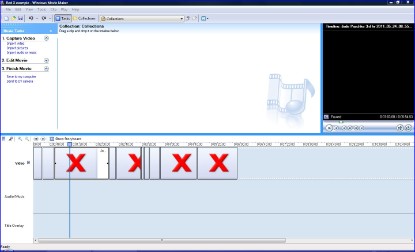
  • Jump drives rock, but you still need to save copies of jpegs, music, photos, or video onto the hard drive OR Red-Xs (shown in photo) will show up each and every time. (UGH)
  • Use the same physical computer for the editing process to avoid Red X Syndrome.
  • PUBLISH the movie for playback, or it’s not portable and others cannot view it.


Photo Story 3 Tips:

  • To avoid problems, save jpegs, music, photos from cameras or online into a computer folder (not just a jump drive).

  • Corrupt file syndrome does not appear often, but when it does, usually a gianormous photo (large pixel sizes 800 x 1000+) are to blame.

  • Large photo sizes overwhelm the program, so look for mid-pixel range, 350 x 400 works pretty well.

  • If you use 100 x 150 pixels, the quality is very poor (blurry).

  • Music: is preloaded in this program. To change music, or add your own is easy. On the music screen, click on the slide you want the music or sound effect added to, and import music. Do this as many times as you like.

  • Many, many students hand in a PS3 Project file which cannot be played. Open the project, continue clicking until at the end of screens, and choose playback on computer (see pictures to the right for how to fix). This is a simple, but much overlooked finishing task.

        The dreaded Movie Maker Red Xs that my students hate! 
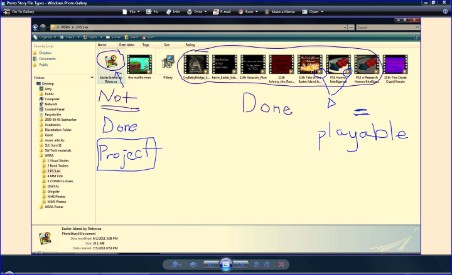
Photo Story 3: Top visual is the difference between a project file and a viewable, playable audio/video file. 
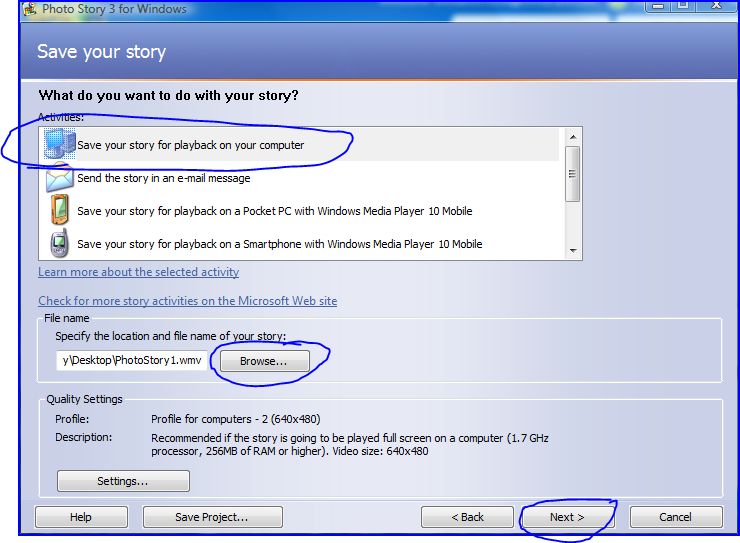
Finishing PS3 for playback is the most missed step by my students. It is the last screen and quite simple!

This free website was made using Yola.

No HTML skills required. Build your website in minutes.

Go to www.yola.com and sign up today!

Make a free website with Yola